
最近更新于 2026-07-26 19:39
测试环境
- ESP32-WROOM-32
- PlatformIO IDE 3.3.4
- PlatformIO Core 6.1.19
- pioarduino platform-espressif32 55.03.311(Arduino Release v3.3.11 based on ESP-IDF v5.5.5)
platformio.ini
[env:esp32dev]
platform = https://github.com/pioarduino/platform-espressif32/releases/download/55.03.311/platform-espressif32.zip
board = esp32dev
framework = arduino
monitor_speed = 115200
实践
源码参考来源:https://github.com/espressif/arduino-esp32/blob/3.3.11/libraries/BLE/examples/Notify/Notify.ino
/*
    功能概述:
    创建一个 BLE 服务器,当有手机/客户端建立连接后,定期(每 0.5 秒)主动向手机推送递增数据包 (Notify)。
    服务的广播 UUID 为: 4fafc201-1fb5-459e-8fcc-c5c9c331914b
    特征值 UUID 为: beb5483e-36e1-4688-b7f5-ea07361b26a8

    架构步骤:
    1. 创建 BLE Server(服务器)
    2. 创建 BLE Service(服务)
    3. 在服务下创建 BLE Characteristic(特征值)
    4. 为特征值添加 BLE Descriptor(描述符)
    5. 启动服务
    6. 开启广播

    当与服务器关联的连接回调函数监测到连接时,将配合主循环定期触发数据通知。
*/

#include <Arduino.h>
#include <BLEDevice.h>
#include <BLEServer.h>
#include <BLEUtils.h>
#include <BLE2902.h> // 提供 0x2902 描述符(客户端特征配置描述符 CCCD,用于使能 Notify/Indicate)
#include <BLE2901.h> // 提供 0x2901 描述符(特征值用户描述符,用于显示文本名称)

// 全局指针与变量定义
BLEServer *pServer = NULL;
BLECharacteristic *pCharacteristic = NULL;
BLE2901 *descriptor_2901 = NULL;

bool deviceConnected = false;    // 当前手机是否处于连接状态
bool oldDeviceConnected = false; // 上一次循环时的连接状态(用于边缘触发判定)
uint32_t value = 0;              // 定时推送的 32 位递增数值

// 可以通过访问 https://www.uuidgenerator.net/ 生成你自己的 UUID
#define SERVICE_UUID "4fafc201-1fb5-459e-8fcc-c5c9c331914b"
#define CHARACTERISTIC_UUID "beb5483e-36e1-4688-b7f5-ea07361b26a8"

/**
 * @brief BLE 服务器连接状态监听回调类
 */
class MyServerCallbacks : public BLEServerCallbacks
{
    // 当客户端成功连接到 ESP32 时触发
    void onConnect(BLEServer *pServer) override
    {
        deviceConnected = true;
    };

    // 当客户端与 ESP32 断开连接时触发
    void onDisconnect(BLEServer *pServer) override
    {
        deviceConnected = false;
    }
};

void setup()
{
    Serial.begin(115200);

    // 1. 初始化 BLE 设备并设置广播名称
    BLEDevice::init("ESP32");

    // 2. 创建 BLE 服务器,并绑定连接/断开事件的回调函数
    pServer = BLEDevice::createServer();
    pServer->setCallbacks(new MyServerCallbacks());

    // 3. 在服务器中创建自定义 GATT 服务
    BLEService *pService = pServer->createService(SERVICE_UUID);

    // 4. 在服务中创建特征值,并开启多种权限:
    // 可读 (READ) | 可写 (WRITE) | 可通知 (NOTIFY) | 可指示 (INDICATE)
    pCharacteristic = pService->createCharacteristic(
        CHARACTERISTIC_UUID,
        BLECharacteristic::PROPERTY_READ |
        BLECharacteristic::PROPERTY_WRITE |
        BLECharacteristic::PROPERTY_NOTIFY |
        BLECharacteristic::PROPERTY_INDICATE);

    // 5. 添加 0x2902 描述符 (Client Characteristic Configuration Descriptor - CCCD)
    // 这是 BLE 标准协议要求的:手机端必须通过写入 0x2902 描述符来开启/关闭 ESP32 的 Notify 推送权限
    // 注:如果未来改用 NimBLE 库,NimBLE 会根据特征值属性自动添加此描述符,无需手动 new
    pCharacteristic->addDescriptor(new BLE2902());

    // 6. 添加 0x2901 描述符 (Characteristic User Description)
    // 用于给这个特征值附带一段人性化的文本说明,手机调试 App 打开后可以直接看到这段文字
    descriptor_2901 = new BLE2901();
    descriptor_2901->setDescription("My own description for this characteristic.");
    descriptor_2901->setAccessPermissions(ESP_GATT_PERM_READ); // 设置该描述符为只读(默认是可读写)
    pCharacteristic->addDescriptor(descriptor_2901);

    // 7. 启动 GATT 服务
    pService->start();

    // 8. 配置并开启广播
    BLEAdvertising *pAdvertising = BLEDevice::getAdvertising();
    pAdvertising->addServiceUUID(SERVICE_UUID);
    pAdvertising->setScanResponse(false);
    pAdvertising->setMinPreferred(0x0); // 设置为 0x00 表示不在广播包中指定推荐连接间隔参数

    BLEDevice::startAdvertising();
    Serial.println("Waiting a client connection to notify...");
}

void loop()
{
    // -------------------------------------------------------------
    // 状态 1:手机当前处于已连接状态 -> 持续推送递增数据
    // -------------------------------------------------------------
    if (deviceConnected)
    {
        // 将 uint32_t 类型的变量 value 转换为无符号 8 位指针格式,推送 4 个字节长度的数据
        pCharacteristic->setValue((uint8_t *)&value, 4);

        // 向已订阅 notification 的客户端主动发送数据变更通知
        pCharacteristic->notify();

        value++;    // 数据递增
        delay(500); // 每 500 毫秒 (0.5秒) 推送一次
    }

    // -------------------------------------------------------------
    // 状态 2:检测到“刚断开连接”的瞬间(下降沿触发)
    // -------------------------------------------------------------
    if (!deviceConnected && oldDeviceConnected)
    {
        delay(500);                  // 给 ESP32 蓝牙协议栈留出处理底层资源释放的缓冲时间
        pServer->startAdvertising(); // 重新开启广播,方便其他或原设备再次连接
        Serial.println("start advertising");

        // 同步状态,防止此 if 分支在下一次 loop 中被重复执行
        oldDeviceConnected = deviceConnected;
    }

    // -------------------------------------------------------------
    // 状态 3:检测到“刚建立连接”的瞬间(上升沿触发)
    // -------------------------------------------------------------
    if (deviceConnected && !oldDeviceConnected)
    {
        // 连接建立的瞬间可以在这里编写一次性的初始化逻辑(如复位计数器、发送欢迎包等)

        // 同步状态,防止此 if 分支在下一次 loop 中被重复执行
        oldDeviceConnected = deviceConnected;
    }
}
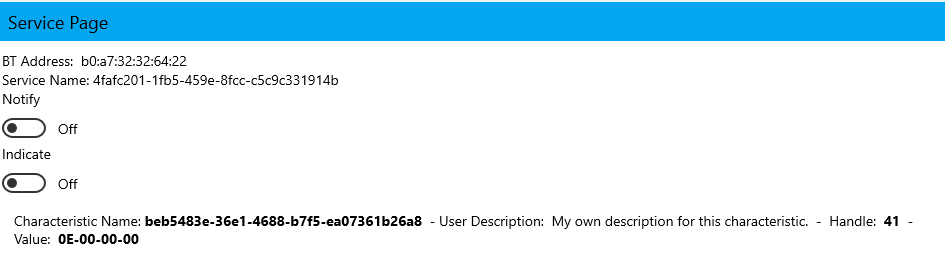
虽然服务器开启了主动通知,但是客户端如果不订阅就不会强推,要点进去开启 Notify
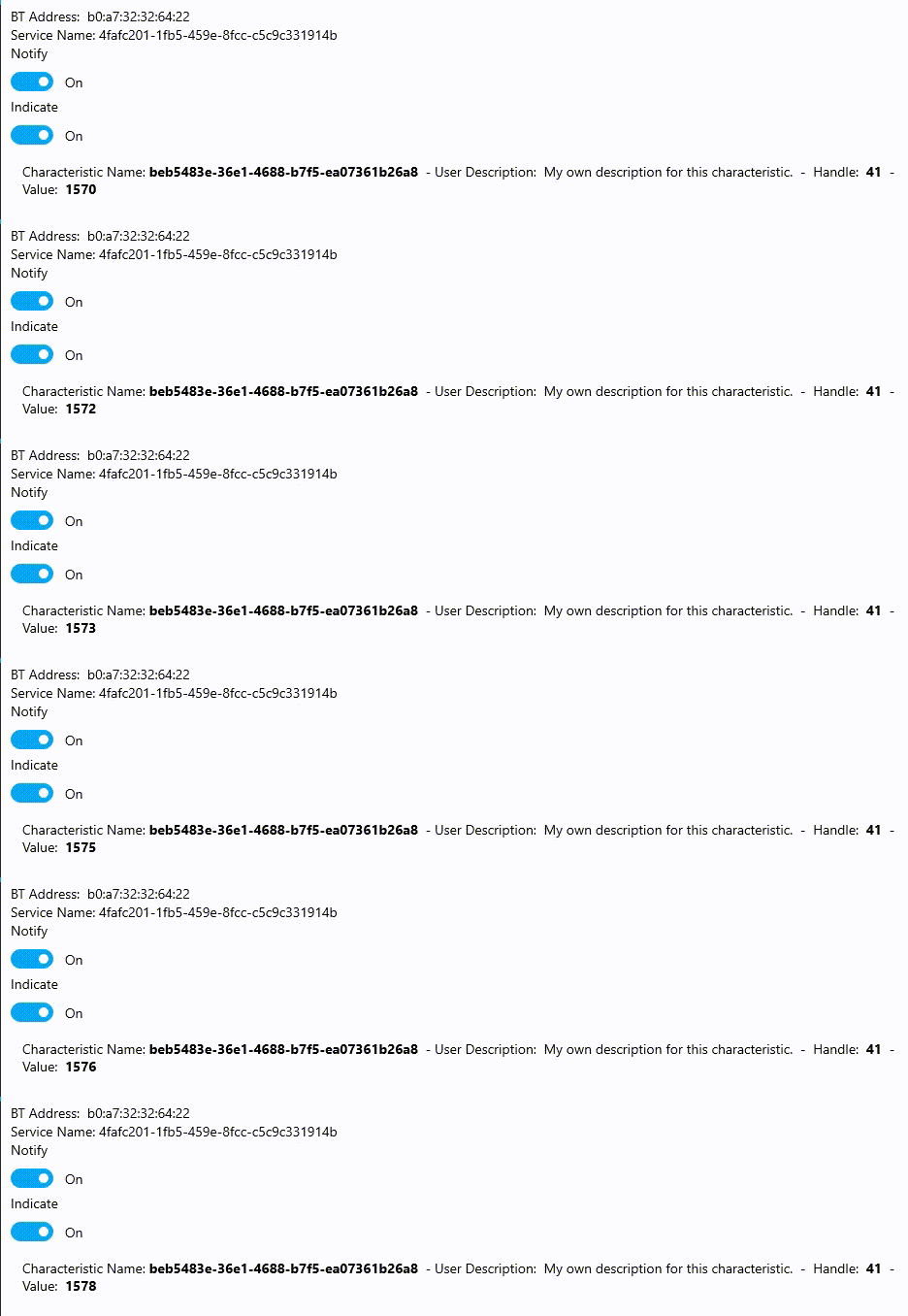
这样就可以看到值实时更新了
基于 ESP32-WROOM-32 实践 BLE 服务器主动通知 Notify – PlatformIO