
最近更新于 2026-07-26 19:38
测试环境
- ESP32-WROOM-32
- PlatformIO IDE 3.3.4
- PlatformIO Core 6.1.19
- pioarduino platform-espressif32 55.03.311(Arduino Release v3.3.11 based on ESP-IDF v5.5.5)
platformio.ini
[env:esp32dev]
platform = https://github.com/pioarduino/platform-espressif32/releases/download/55.03.311/platform-espressif32.zip
board = esp32dev
framework = arduino
monitor_speed = 115200
实践
源码参考来源:https://github.com/espressif/arduino-esp32/blob/3.3.11/libraries/BLE/examples/Write/Write.ino
#include <Arduino.h>
#include <BLEDevice.h> // ESP32 BLE 核心基础库
#include <BLEUtils.h>  // BLE 实用工具函数库
#include <BLEServer.h> // BLE 服务器相关类

// 可以通过访问 https://www.uuidgenerator.net/ 在线生成你自己的唯一 UUID
// 定义自定义 GATT 服务的 UUID
#define SERVICE_UUID "4fafc201-1fb5-459e-8fcc-c5c9c331914b"
// 定义自定义特征值 (Characteristic) 的 UUID
#define CHARACTERISTIC_UUID "beb5483e-36e1-4688-b7f5-ea07361b26a8"

/**
 * @brief 自定义特征值回调类
 * 继承自 BLECharacteristicCallbacks,用于重写事件处理函数
 */
class MyCallbacks : public BLECharacteristicCallbacks
{
    /**
     * @brief 当客户端(如手机)向此特征值写入数据时,底层的 BLE 协议栈会自动回调此函数
     * @param pCharacteristic 触发该事件的特征值对象的指针
     */
    void onWrite(BLECharacteristic *pCharacteristic) override
    {
        // 从特征值中获取客户端写入的数据(以 String 类型接收)
        String value = pCharacteristic->getValue();

        // 判断接收到的数据长度是否大于 0
        if (value.length() > 0)
        {
            Serial.println("*********");
            Serial.print("New value: ");

            // 逐个字节读取并打印手机发送过来的字符
            for (int i = 0; i < value.length(); i++)
            {
                Serial.print(value[i]);
            }

            Serial.println();
            Serial.println("*********");
        }
    }
};

void setup()
{
    Serial.begin(115200);

    // 串口打印测试指引,提示用户如何在手机端操作
    Serial.println("1- Download and install an BLE scanner app in your phone");
    Serial.println("2- Scan for BLE devices in the app");
    Serial.println("3- Connect to MyESP32");
    Serial.println("4- Go to CUSTOM CHARACTERISTIC in CUSTOM SERVICE and write something");
    Serial.println("5- See the magic =)");

    // 1. 初始化 BLE 设备,并指定广播名称为 "MyESP32"
    BLEDevice::init("MyESP32");

    // 2. 创建 BLE 服务器对象
    BLEServer *pServer = BLEDevice::createServer();

    // 3. 在服务器中创建自定义 GATT 服务
    BLEService *pService = pServer->createService(SERVICE_UUID);

    // 4. 在服务中创建特征值,设置权限为:可读 (PROPERTY_READ) 和 可写 (PROPERTY_WRITE)
    BLECharacteristic *pCharacteristic =
        pService->createCharacteristic(CHARACTERISTIC_UUID,
                                       BLECharacteristic::PROPERTY_READ |
                                           BLECharacteristic::PROPERTY_WRITE);

    // 5. 将前面实例化的回调类绑定到该特征值上
    // 当手机执行写入动作时,就会自动触发 MyCallbacks::onWrite
    pCharacteristic->setCallbacks(new MyCallbacks());

    // 6. 为特征值设置初始默认内容(手机读取时能看到的字符串)
    pCharacteristic->setValue("Hello World");

    // 7. 启动该 GATT 服务
    pService->start();

    // 8. 获取广播控制对象并直接开启广播
    BLEAdvertising *pAdvertising = pServer->getAdvertising();
    pAdvertising->start();
}

void loop()
{
    // BLE 的事件响应(包括连接、数据接收)均由后台蓝牙任务自动处理
    // 因此 loop() 内不需要轮询 BLE 逻辑,只需保持主线程休眠或执行其他日常任务
    delay(2000);
}
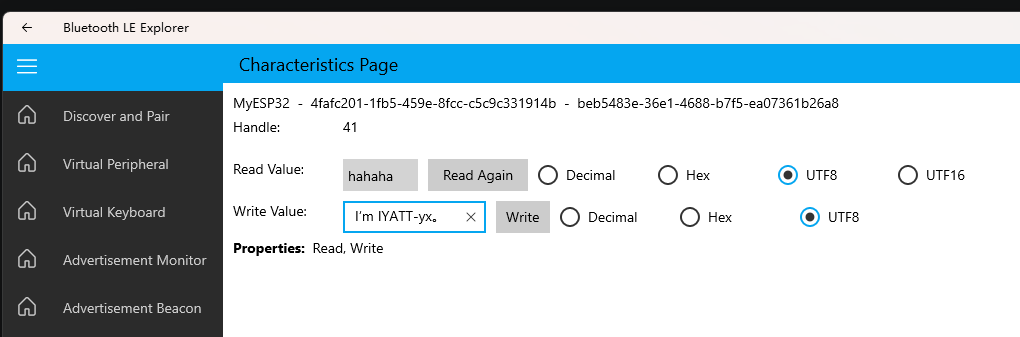
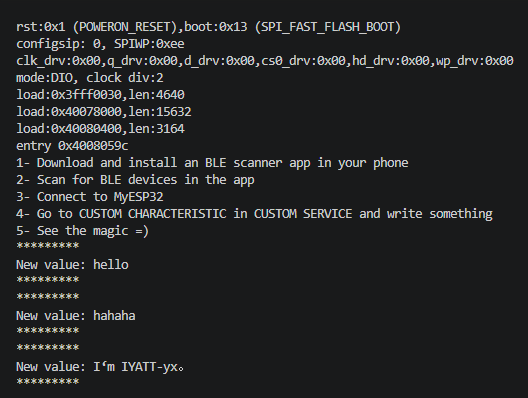
这个案例可以把被修改的内容显示出来,可以学习如何监听属性值被修改了
基于 ESP32-WROOM-32 实践 BLE 服务器监听内容写入 Write – PlatformIO