
最近更新于 2026-08-08 23:24
测试环境
- ESP32-WROOM-32
- PlatformIO IDE 3.3.4
- PlatformIO Core 6.1.19
- pioarduino platform-espressif32 55.03.311(Arduino Release v3.3.11 based on ESP-IDF v5.5.5)
platformio.ini
[env:esp32dev]
platform = https://github.com/pioarduino/platform-espressif32/releases/download/55.03.311/platform-espressif32.zip
board = esp32dev
framework = arduino
monitor_speed = 115200
实践
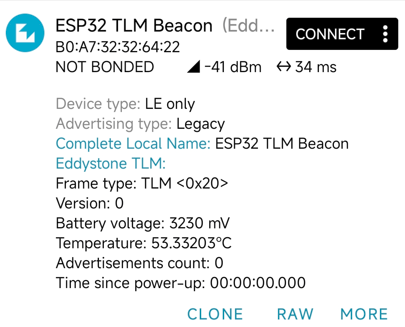
EddystoneTLM_Beacon 是谷歌设计的,用于广播设备的电压、温度和运行时间。一般是运维人员查看设备健康状态的情境下会使用。
下面的案例会广播电压和温度,温度部分我对参考案例做了修改,会读取真实的芯片传感器温度,而不是随机数。
/*
   ESP32-WROOM-32 Eddystone-TLM 遥测信标(使用真实片上温度)

   数据说明:
   - 温度:提取 ESP32 内部晶圆结温,并转换装载到 TLM 8.8 定点数格式中
   - 电池:模拟电池电压(如硬件连接了 VBAT 分压 ADC,可替换为真实采样值)
*/

#include "sys/time.h"
#include <Arduino.h>

#include "BLEDevice.h"
#include "BLEUtils.h"
#include "BLEBeacon.h"
#include "BLEAdvertising.h"
#include "BLEEddystoneTLM.h"
#include "esp_sleep.h"

// 1. C 语言外部声明:引用 ESP32-WROOM-32 底层片上温度传感器接口
#ifdef __cplusplus
extern "C"
{
#endif
    uint8_t temprature_sens_read();
#ifdef __cplusplus
}
#endif

#define GPIO_DEEP_SLEEP_DURATION 2 // 唤醒后广播 10 秒,休眠 2 秒
#define BEACON_POWER ESP_PWR_LVL_N12

RTC_DATA_ATTR static time_t last;        // RTC 慢速内存:保存上一次唤醒的 Unix 时间戳
RTC_DATA_ATTR static uint32_t bootcount; // RTC 慢速内存:保存设备唤醒总次数

BLEAdvertising *pAdvertising;
struct timeval nowTimeStruct;

/**
 * @brief 读取真实芯片温度并构建 Eddystone-TLM 遥测广播帧
 */
void setBeacon()
{
    BLEEddystoneTLM EddystoneTLM;

    // -------------------------------------------------------------
    // 读取 ESP32 芯片内部传感器
    // -------------------------------------------------------------
    uint8_t raw_temp = temprature_sens_read();     // 获取原始 ADC 采样值
    float chip_temp_c = (raw_temp - 32.0f) / 1.8f; // 华氏度转换为摄氏度 (°C)

    // 将摄氏度设置到 TLM 类中,底层会自动编码为 Eddystone 要求的 8.8 定点数
    EddystoneTLM.setTemp(chip_temp_c);

    // 模拟设定系统电压(单位:mV,如 3300mV = 3.3V)
    // 后续若有硬件分压电路接入 ADC,可在此替换为真实的电池读取数值
    EddystoneTLM.setVolt((uint16_t)random(3200, 3300));

    // 串口调试输出
    Serial.printf("TSENS Raw Value : %u\n", raw_temp);
    Serial.printf("Real Chip Temp  : %.2f °C\n", EddystoneTLM.getTemp());
    Serial.printf("TLM 8.8 Format  : 0x%04X\n", EddystoneTLM.getRawTemp());
    Serial.printf("Battery Voltage : %u mV\n", EddystoneTLM.getVolt());

    // -------------------------------------------------------------
    // 打包广播数据包
    // -------------------------------------------------------------
    BLEAdvertisementData oAdvertisementData = BLEAdvertisementData();
    BLEAdvertisementData oScanResponseData = BLEAdvertisementData();

    // 将 TLM 负载装载至 Service Data 中,挂载 Google 专用的 0xFEAA 16位短 UUID
    oScanResponseData.setServiceData(
        BLEUUID((uint16_t)0xFEAA),
        String(EddystoneTLM.getData().c_str(), EddystoneTLM.getData().length()));

    oAdvertisementData.setName("ESP32 TLM Beacon");

    pAdvertising->setAdvertisementData(oAdvertisementData);
    pAdvertising->setScanResponseData(oScanResponseData);
}

void setup()
{
    Serial.begin(115200);
    gettimeofday(&nowTimeStruct, NULL);

    Serial.printf("\n=========================================\n");
    Serial.printf("Starting ESP32 TLM Beacon (BootCount: %" PRIu32 ")\n", bootcount++);
    Serial.printf("Time since last boot: %" PRIu32 "s\n", (uint32_t)(nowTimeStruct.tv_sec - last));
    Serial.printf("=========================================\n");

    last = nowTimeStruct.tv_sec;

    // 初始化 BLE 引擎与设置硬件发射功率
    BLEDevice::init("TLMBeacon");
    BLEDevice::setPower(BEACON_POWER);

    pAdvertising = BLEDevice::getAdvertising();

    // 装载遥测数据
    setBeacon();

    // 开启广播并维持 10 秒
    pAdvertising->start();
    Serial.println("Advertising TLM data for 10s...");
    delay(10000);

    // 停止广播并进入 Deep Sleep
    pAdvertising->stop();
    Serial.println("Entering Deep Sleep...");
    esp_deep_sleep(1000000LL * GPIO_DEEP_SLEEP_DURATION);
}

void loop()
{
    // Deep Sleep 唤醒后芯片直接复位重走 setup(),不会执行 loop
}| 字段名称 | 字节大小 | 说明与格式 |
|---|---|---|
| Frame Type (类型) | 1 字节 | 固定为 0x20,用于标识该广播包为 TLM 遥测帧。 |
| VERSION (版本) | 1 字节 | 固定为 0x00(当前协议版本)。 |
| VBATT (电池电压) | 2 字节 | 无符号 16 位整数,单位为毫伏(mV)。 |
| TEMP (温度) | 2 字节 | 带符号的 8.8 定点数格式。 |
| ADV_CNT (广播计数器) | 4 字节 | 自设备上电或重启以来,已发送的广播帧总数。 |
| SEC_CNT (运行时间) | 4 字节 | 自设备上电或重启以来的运行时间,精度为 0.1 秒(每过 1 秒该值加 10)。 |
基于 ESP32-WROOM-32 实践 EddystoneTLM_Beacon 遥测(广播电压、温度) – PlatformIO