
最近更新于 2026-05-30 11:21
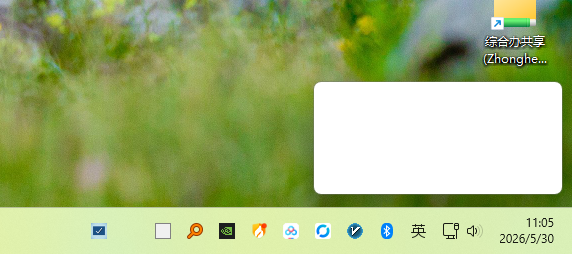
桌面右下角残留了一个白框,不是纯视觉残留,重启 Explorer 还存在,是确实有个框体在这里,会阻塞鼠标操作。
用 Google Gemini 写了一段 C++ 代码,运行后将光标悬停在窗口上可以显示出窗体信息
#include <iostream>
#include <windows.h>
#include <psapi.h>

int main()
{
    setlocale(LC_ALL, "chs");

    while (true)
    {
        POINT pt;
        if (GetCursorPos(&pt))
        {
            HWND hWnd = WindowFromPoint(pt);
            if (hWnd != NULL)
            {
                HWND hRootWnd = GetAncestor(hWnd, GA_ROOT);
                if (hRootWnd != NULL)
                {
                    hWnd = hRootWnd;
                }

                wchar_t szClassName[256] = { 0 };
                GetClassNameW(hWnd, szClassName, 256);

                DWORD dwProcessId = 0;
                GetWindowThreadProcessId(hWnd, &dwProcessId);

                // 初始化路径缓冲区
                wchar_t szProcessPath[MAX_PATH] = { 0 };

                // 尝试获取进程句柄,需要虚拟机查询与读取权限
                HANDLE hProcess = OpenProcess(PROCESS_QUERY_INFORMATION | PROCESS_VM_READ, FALSE, dwProcessId);
                if (hProcess != NULL)
                {
                    // 获取完整路径
                    if (GetModuleFileNameExW(hProcess, NULL, szProcessPath, MAX_PATH) == 0)
                    {
                        wcscpy_s(szProcessPath, L"无法获取完整路径 (权限不足或调用失败)");
                    }
                    CloseHandle(hProcess);
                }
                else
                {
                    // 针对部分系统核心进程,拒绝访问时常备的备用方案
                    hProcess = OpenProcess(PROCESS_QUERY_LIMITED_INFORMATION, FALSE, dwProcessId);
                    if (hProcess != NULL)
                    {
                        DWORD dwSize = MAX_PATH;
                        if (QueryFullProcessImageNameW(hProcess, 0, szProcessPath, &dwSize) == 0)
                        {
                            wcscpy_s(szProcessPath, L"拒绝访问 (无法获取路径)");
                        }
                        CloseHandle(hProcess);
                    }
                    else
                    {
                        wcscpy_s(szProcessPath, L"拒绝访问 (无法打开进程句柄)");
                    }
                }

                std::wcout << L"当前鼠标坐标: (" << pt.x << L", " << pt.y << L")" << std::endl;
                std::wcout << L"窗口句柄 (HWND): 0x" << std::hex << hWnd << std::endl;
                std::wcout << L"窗口类名 (Class): " << szClassName << std::endl;
                std::wcout << L"所属进程 ID (PID): " << std::dec << dwProcessId << std::endl;
                std::wcout << L"进程完整路径: " << szProcessPath << std::endl;
                std::wcout << L"--------------------------------------" << std::endl;
            }
        }
        Sleep(1000);
    }

    return 0;
}
真相大白了,这玩意是百度网盘的弹窗
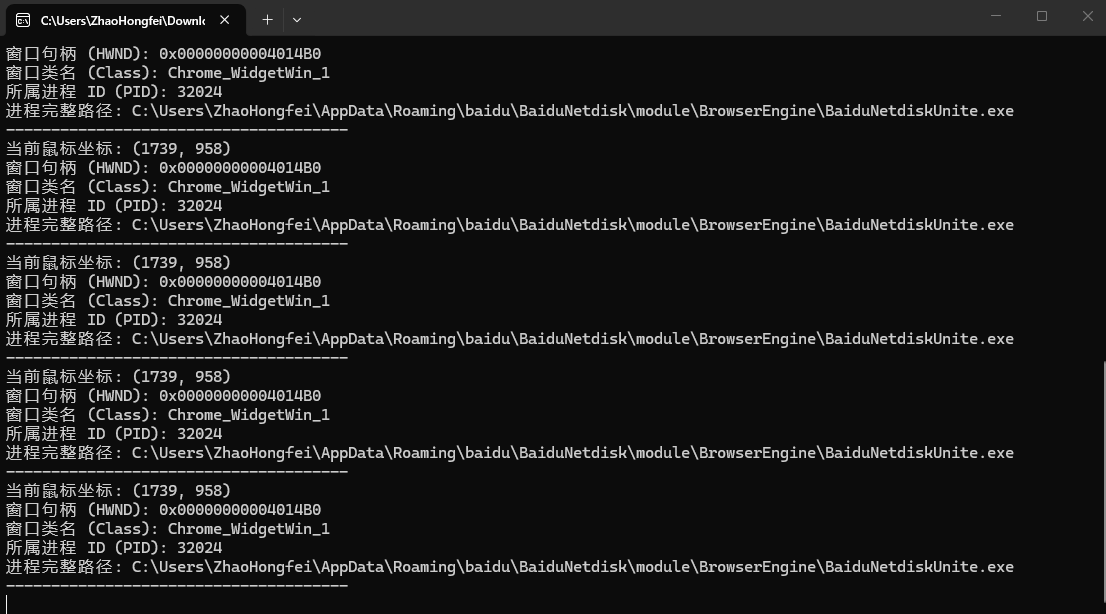
百度网盘有毛病?残留一个白框。